PyPI Trusted Publishing
To effectively publish a package or wheel to PyPI, you’ll need an ActiveState account and the State Tool and follow the steps below. Existing ActiveState users who have the State Tool installed and are authenticated can begin at step 3.
- Create a new Python project
- Create and Test Your Python Project
- Publish your package to the ActiveState Platform
- [Creating a PyPI project with a Trusted Publisher](#4-pypi-projects-with-a-trusted-publisher
- Build and download your Python wheel (optional)
- Publish to PyPI
Before you can begin, you must have the State Tool installed, have an ActiveState Account, and be authenticated in the State Tool.
1. Create a new Python project using the State Tool
The ActiveState Platform bundles your dependencies into an easily consumable and deployable project runtime. Runtimes can be created for one user, or shared with other users who are members of the same organization.
To create a new Python project, open a command terminal and enter
state init <org/project> --language python@<language version>
Where org is the name of your ActiveState organization publishing the package and project is the name of the project where the package will be published. For example, to initialize an ActiveState project with the organization name ExampleOrgName and project name NewPyPI with Python version 3.10, enter state init ExampleOrgName/NewPyPI --language python@3.10.13
Note that the project name (project) can be selected by the user, but the organization name (org) MUST match the name of the ActiveState organization to which the project belongs.
For language version, enter the Python version for your project, for example python@3.10.13. This will create a new project on the ActiveState Platform.
To start a virtual environment and begin working with your project, enter
state shell <org/project>
Or, to set the project as your system default, enter
state use <org/project>
You have successfully created a new ActiveState project. This project is now available to any member of your organization, and on multiple platforms and operating systems.
2. Create and Test Your Python Project
Create your unique source code and test that source code in your new ActiveState Python project.
3. Publish Your Package to the ActiveState Platform
Contact support@activestate.com to request that your Python project be published. Please include your org name and project name in the email.
4. PyPI projects with a Trusted Publisher
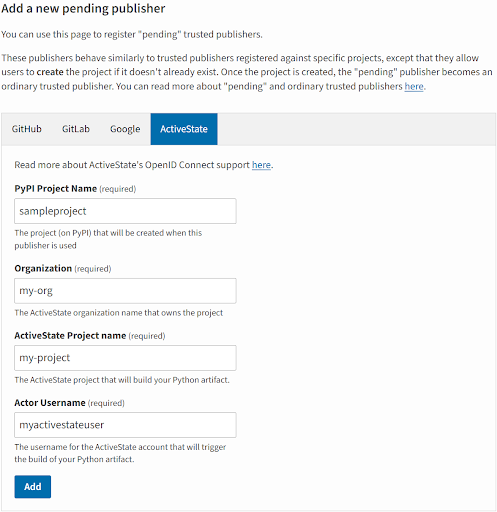
Add ActiveState as a Trusted Publisher of a new PyPI project
- Open your test PyPI account and go to the Publishing tab under Your account.
- Click the ActiveState tab in the table (shown below)
- Enter the requested information from your ActiveState account (note the PyPI project name and the ActiveState project name must be identical)
- Click Add to complete
After clicking the Add button, your account will be updated with a new pending project name.
Add ActiveState as a Trusted Publisher to an existing project
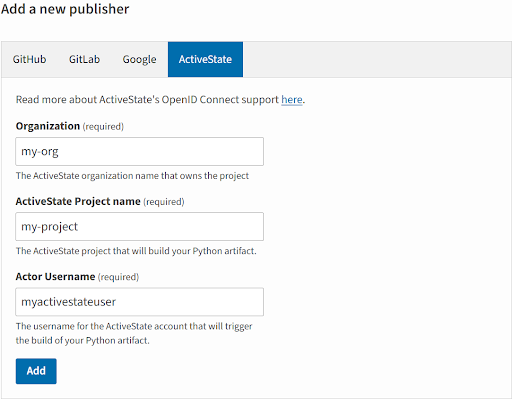
Login to your test.pypi.org account and select a project from the Your Projects tab.
- Click the Manage button next to the project
- Scroll down and click the ActiveState tab in the table (shown below)
- Enter the requested information from your ActiveState account (note the PyPI project name and the ActiveState project name must be identical)
- Click Add to complete
After clicking the Add button, ActiveState will be added as a Trusted Publisher to the existing PyPI project.
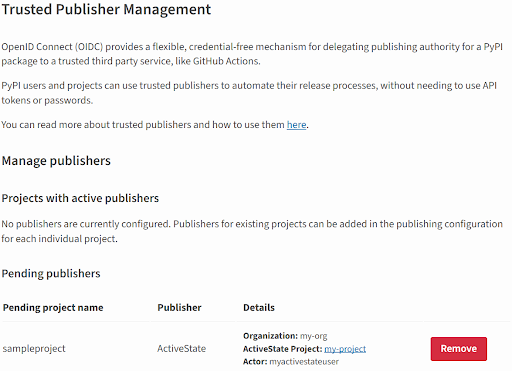
After successfully adding ActiveState as a Trusted Publisher to a new or existing project, the following will be visible from the Publishing tab of your test.pypi.org account.
5. Build a Python wheel (optional)
To test your wheel before publishing it to PyPI (covered in the next step)
-
To build your wheel, run
state eval wheels -
After building your wheel, run
state builds --allto view all of the builds available. Take note of theHASH_IDvalue of your new wheel. -
Run
state builds dl <HASH_ID>to download and test the wheel you've built.
6. Publish to PyPI
When you're ready to publish your package (or wheel) to PyPI, enter the following into your command terminal
state eval publish_receipt
And that’s it! Using the ActiveState Platform, you have successfully published a Python package or wheel to PyPI.